
Free guide · Data architecture
The Modern Data Checklist
20 essential architecture elements, explained.
This checklist outlines 20 essential architecture elements, based on 30+ implementations over the past decade.
Use it to validate your existing design, or to more effectively build a new one.
Go through it one section at a time and check off what you already have in place. For some teams the whole thing is new. For others it's one or two areas worth tweaking in a process that already works.
Let's begin.
Section 1Design
The five core components.
 ▶ Watch · 8:18
Data By Design: The Art of Building A Data Warehouse
▶ Watch · 8:18
Data By Design: The Art of Building A Data Warehouse
I think of data engineering as three pillars. Sources on the left, insights on the right, and a central hub in the middle.
Sources are what the business uses to run its operations: APIs, internal databases, SaaS applications, and raw files like CSVs and spreadsheets. Insights are the point of all of it, because the business wants some version of that data to make a decision. The central hub is where we as data people spend pretty much all of our time, turning sources into insights through ingestion, data modeling and workflow.
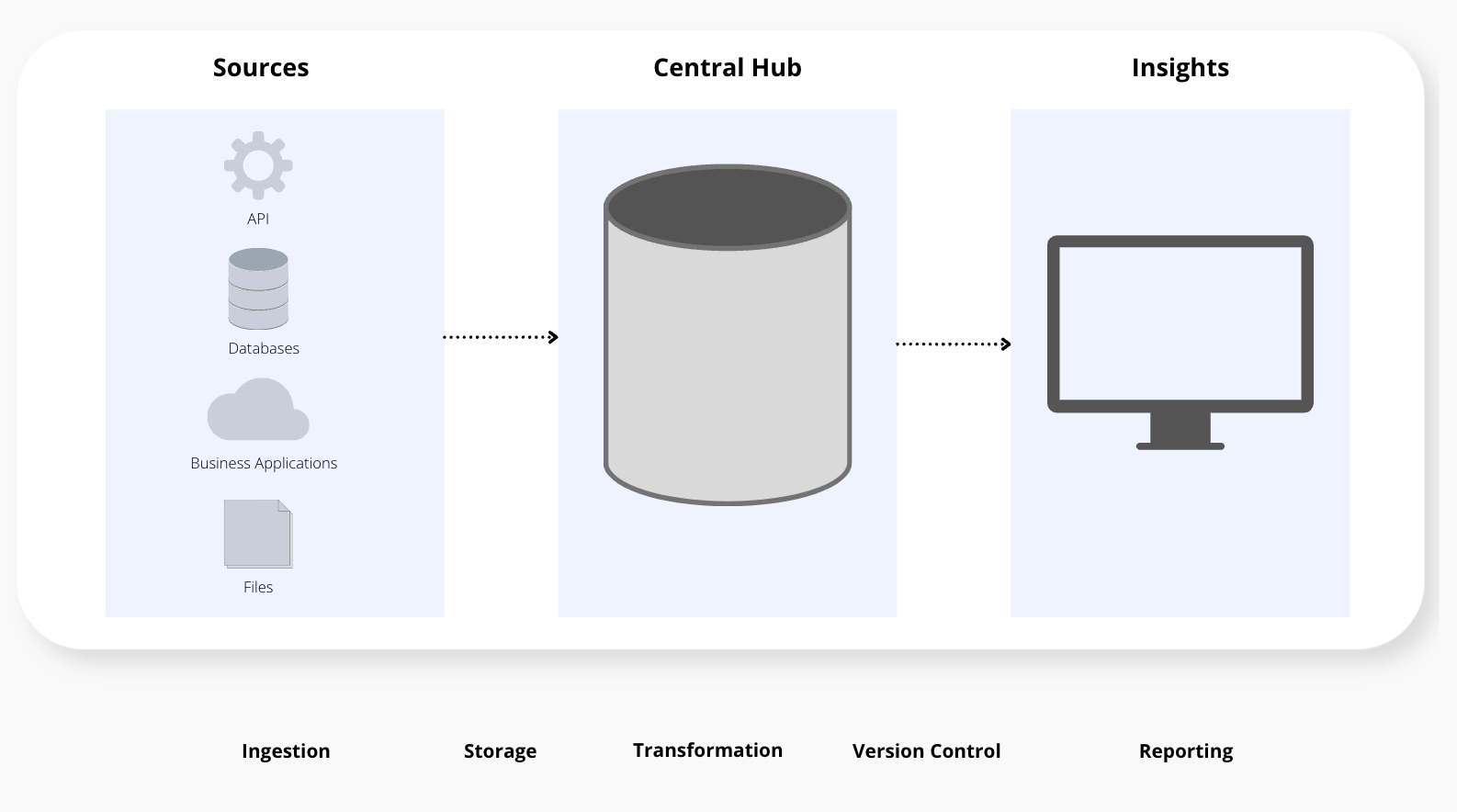
There are many more things you can add to a data architecture, but in my experience these five are the ones you want to start with.
Checklist · 5 itemsDesign
-
Where will the data live? You need one central place to build your warehouse. Snowflake, BigQuery and Postgres are common choices.
-
How will the data get there? This loads your source data into storage. Stitch, Airbyte and Fivetran are all examples.
-
Where you clean up the data and apply business logic. Probably 80 to 90% of the work happens here. I use dbt.
-
How you repeat the process consistently. GitHub or GitLab, together with dbt, let you isolate your logic across environments.
-
How you analyze it. Power BI, Tableau and Metabase are examples, connected to your marts.
Here's what that looks like in practice, from implementations I've worked on:
| Stack | Database | Ingestion | Transformation | Version control | Reporting |
|---|---|---|---|---|---|
| Example 1 | Snowflake | Stitch | dbt | GitHub | Power BI |
| Example 2 | BigQuery | Airbyte | dbt | GitHub | Tableau |
| Example 3 | Postgres | Fivetran | dbt | GitLab | Metabase |
Same concepts, same strategy, just different tools. When you have the strategy in place, you're really just mixing and matching what works for you. What a lot of teams do instead is pick the tools first without really knowing what they want to do with them or where they want to go.
Note: In Postgres you don't typically query across databases, so everything lives in one database and naming prefixes keep the same separation.
Section 2Ingestion
Setting up the landing zone.
 ▶ Watch · 4:15
Fix Your Data Pipeline...From The Start
▶ Watch · 4:15
Fix Your Data Pipeline...From The Start
The landing zone is where your source data first lands in your database. It's the foundation for the rest of your pipeline.
It's also the part a lot of teams move past too quickly, and overlooking it causes a lot of mistakes later on in your architecture.
If you're missing a lot on this checklist, start here. The structure you set up in the landing zone trickles down into the rest of your project: your data modeling, your marts and your reporting.
Checklist · 5 itemsIngestion
-
Keep raw data in its own space, separate from everything you build on top of it. A database called
rawworks well. -
Don't just mimic whatever the source calls things. Name each raw schema after its source (or prefix with
raw_), then repeat it for every new source. -
Create one role, like
loader, that holds the permissions to your raw objects. That's the only place your loading tools need access. -
Give each loading tool its own user, assigned to the
loaderrole, instead of a shared admin user with access to the whole pipeline. -
Mirror your raw sources in your dbt project, with a subdirectory for each source, so the project maps straight back to the database.
Section 3Modeling
The three-layer approach.
 ▶ Watch · 9:41
How to Create a Data Modeling Pipeline (3 Layer Approach)
▶ Watch · 9:41
How to Create a Data Modeling Pipeline (3 Layer Approach)
A data warehouse is the central hub for most data teams, and it's also where a lot of the headaches come from. Either what's been built has gotten out of control and unorganized, or a team is starting from scratch without a clear idea of what to put in place.
What I typically implement is a simple three-layer model on top of the raw data:
- Staging: Clean up each source table
- Warehouse: Build the data model (ex. facts and dimensions)
- Marts: Serve clean tables to reporting
Each layer only pulls from the one before it.
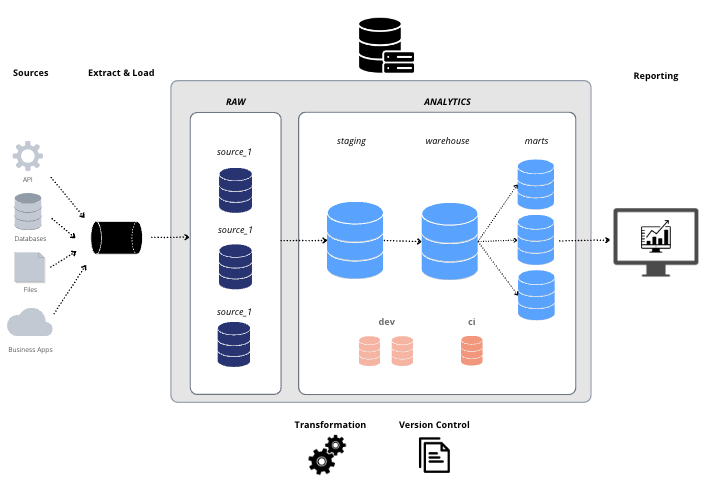
You can try to get cute and put everything into one big table, skipping the modeling. I think that leaves you exposed to overly complicated logic that's very difficult to maintain.
Not all of this is for performance reasons. A lot of it has to do with mental clarity. If you're spending your time figuring out where something goes or what the impact of a change is, that's less time spent on changes that actually help the business.
Checklist · 5 itemsModeling
-
One staging model per raw table for simple cleanup, like renaming columns and converting data types. Deploy as views and handle each conversion one time.
-
Fact tables hold the keys to their dimensions and the metrics, nothing else. Descriptive values belong in dimensions.
-
The descriptive values you filter and group by, like names, categories and statuses. No metrics, and they pull from staging, never raw.
-
Marts only pull from the warehouse and are the only thing connected to reporting. Build a few wide, reusable marts rather than one per report.
-
Every warehouse table gets a key you generate and control, instead of the source system's ID. A change to source IDs won't break your model.
Section 4Workflow
How changes reach production.
 ▶ Watch · 12:34
The Art of Data Team Workflows (Environments, Automation & More)
▶ Watch · 12:34
The Art of Data Team Workflows (Environments, Automation & More)
Now more than ever, building a data architecture is less about writing actual code and more about the process and systems you have for managing it.
For a lot of teams, making a change means editing the database directly. A stored procedure gets overwritten and all of a sudden it's live in production, with little or no automated testing in between. The modern approach keeps your logic in code, and every change goes through a process before it reaches production.
A good rule of thumb: never commit directly to the main branch.
Checklist · 5 itemsWorkflow
-
All transformation logic lives in version control, not saved straight to the database. The main branch should always match production.
-
Production for the business, a dev schema for each developer (like
dev_jsmith), and a CI environment where changes get tested during review. -
Automation builds each change in CI and runs your tests before anything reaches production. People make mistakes, and this is where you catch them.
-
Production refreshes automatically on a set schedule, daily for most teams, using the code you've tested and approved.
-
Work happens on a feature branch and goes through a pull (or merge) request, where checks run and teammates review it before it deploys.
Common questions
Do I need all 20 items?
Not all at once. Use the checklist to see where you stand. For some teams it's a full rebuild, and for others it's one or two areas to tweak in a process that already works.
Where should I start if I'm missing a lot?
The landing zone. The naming conventions and security you set there carry through the rest of the project, so getting them right early makes every later layer easier to build.
Which tools should I pick?
Start with the strategy. Once you know the five core components and where you're going with them, picking tools is mixing and matching what works for you. Snowflake or BigQuery, Stitch or Fivetran, Power BI or Tableau all fit the same design.
Should staging models be views or tables?
Views. Staging is a cleaned-up version of each source table, so storing it as a table just doubles your storage.
Can I skip data modeling and use one big table?
You can, but you leave yourself exposed to overly complicated logic that gets hard to maintain as you grow. A clear path from raw to staging to warehouse to marts means your team knows where everything lives and how to update it.
What should I name my environments?
Whatever fits your team. DEV, CI and PROD are common, and CI is also called test, UAT or pre-production. What matters is that development and testing happen somewhere separate from production.
Recap
 ▶ Watch · 11:47
Why Bother With Naming Conventions? | Data Architecture
▶ Watch · 11:47
Why Bother With Naming Conventions? | Data Architecture
The checklist covers 20 elements across 4 areas:
- DesignCover the 5 core components (vs chasing tools)
- IngestionSet your conventions in a clean landing zone
- ModelingBuild in 3 layers: staging, warehouse, marts
- WorkflowMove every change through DEV and CI before PROD
Some of these you're probably already doing well. Others might be worth a second look.
Next stepThe Starter Guide for Data Modeling
Modeling is where most of the work happens. The guide covers why it matters, facts vs dimensions, the common table types, and 3 mistakes that derail a model.
Cheers,
Michael
Work with me
Lay the foundation for an AI-ready data warehouse in 8 weeks
I work with small data teams to clean up their data with the right modeling, structure and workflow. Your team walks away with a blueprint to follow and the confidence to own it long term.
See how it works →